
Licensing 1 — Mortgage licensing & compliance
Licensing, off the spreadsheet.
One system of record for every loan officer, every state license, every sponsorship, and every renewal. Built for mortgage brokers and the licensing companies that support them.
Demo
See it in one minute.
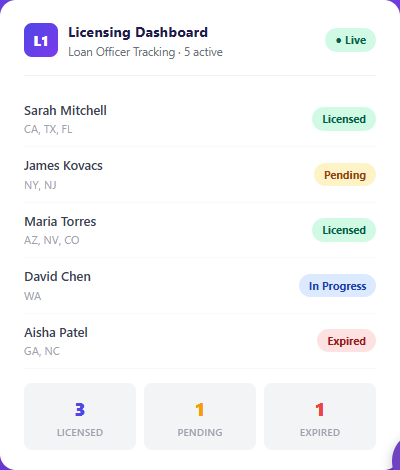
A narrated walkthrough of the screens a licensing team lives in: the roster by branch, unlicensed hires, the sponsorship pipeline, compliance, licensing spend and renewal season.
Narrated, with captions. Every screen shows sample data. 1:04 · 1080p
Read the transcript
- 0:00
- Your brokers run licensing on a spreadsheet: one owner, per-state tabs, and no history.
- 0:05
- A loan officer who isn't licensed in that state can't take the lead, and the loan never reaches you.
- 0:11
- One system of record: employees, loan officers, licenses, sponsorships, and renewals in one place.
- 0:18
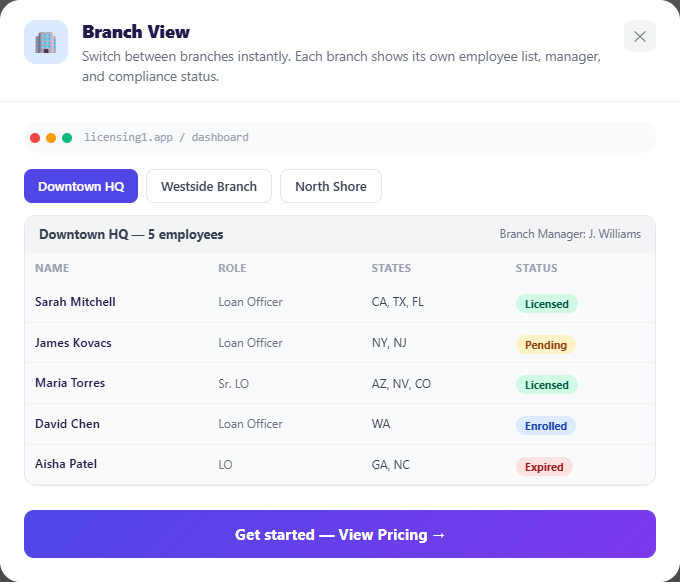
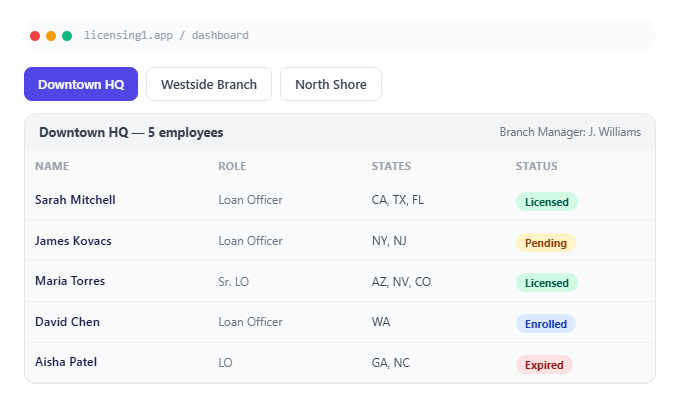
- The whole roster, by branch, with deactivated staff kept on file.
- 0:22
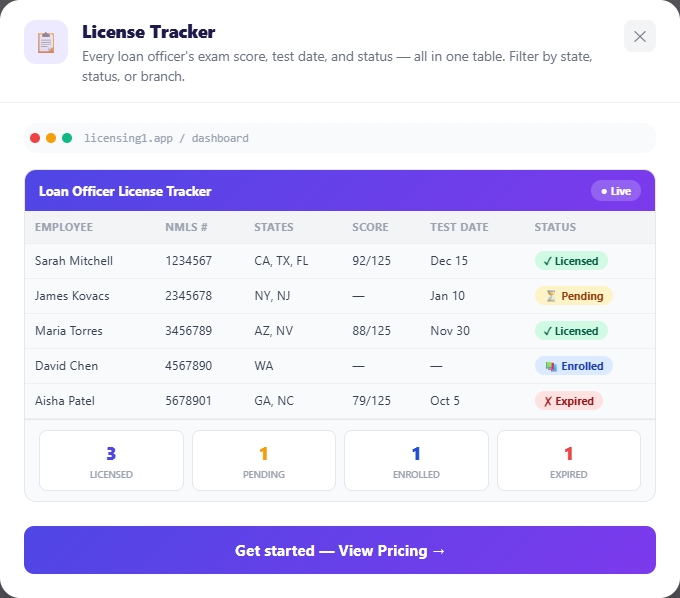
- Every unlicensed hire tracked to the exam: course, NMLS account, certificate, test date, score, and attempt.
- 0:30
- Sponsorship run as a pipeline, with an owner and an action on every name.
- 0:35
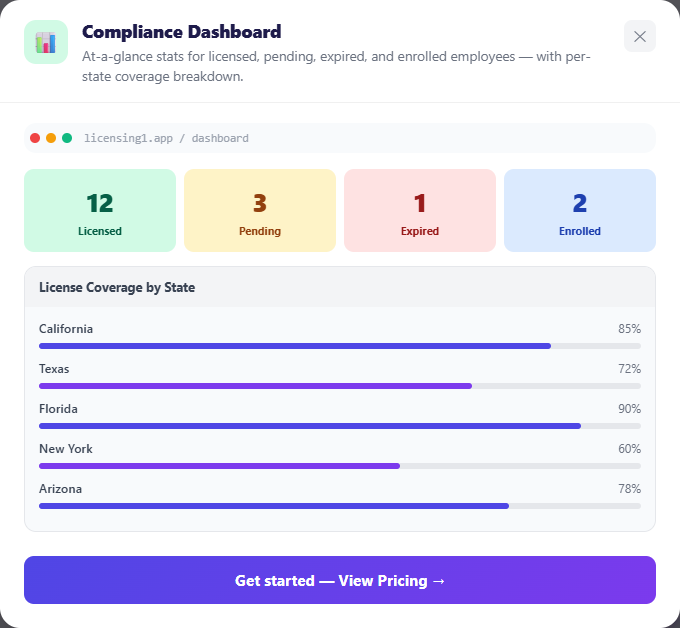
- Compliance scored and dated: expired licenses, renewals coming due, and who still need CE.
- 0:41
- Every licensing dollar, per person, by branch, year, and state, with the receipt attached.
- 0:47
- Act on a person from the row: open their map, message them, or assign a task.
- 0:52
- Renewal season becomes a countdown, not a scramble. Every open item has an owner and a date.
- 0:58
- Licensing, off the spreadsheet. Built for independent mortgage brokers. licensing1.com.
A look inside
The screens a licensing team lives in.
Examples from licensing1.com. The people and numbers are sample data.
The problem
Four systems hold the answer. None of them holds all of it.
"Is this person licensed, in this state, today?" should take a second to answer. At most mortgage companies it takes a spreadsheet, an inbox search, and the one person who knows how it works.
NMLS
The regulator's system of record. Authoritative, but built for filing, not for running an operation: no alerts, no assignment, no internal workflow.
Spreadsheets
The real system of record in most brokerages. Per-state tabs, one owner, and no history of who changed what.
Email and chat
Where sponsorship approvals, license evidence, and exception decisions actually live, and where audit trails get lost.
Payroll and HR
Knows every person and every hire date. Knows nothing about which states that person can originate in this morning.
Who it's for
Brokers, lenders, and the licensing companies behind them.
Brokers and lenders
Any company that employs licensed loan originators. One roster across every branch, every state license, and the renewals that come with them, plus a clear path for every new hire from unlicensed to producing.
Licensing companies
Firms that sponsor originators for other companies. Their own portal to manage every client broker, with visibility only into what each broker chooses to share, and a team workspace with assignments and coverage.
What it does
Six core capabilities
01
One roster, every branch
Employees, loan officers, and unlicensed staff in one list, filtered by branch and searchable by name, email, NMLS ID, or position. A whole company imports from a spreadsheet in one pass. People who leave stay on file, because their licensing history has to.
02
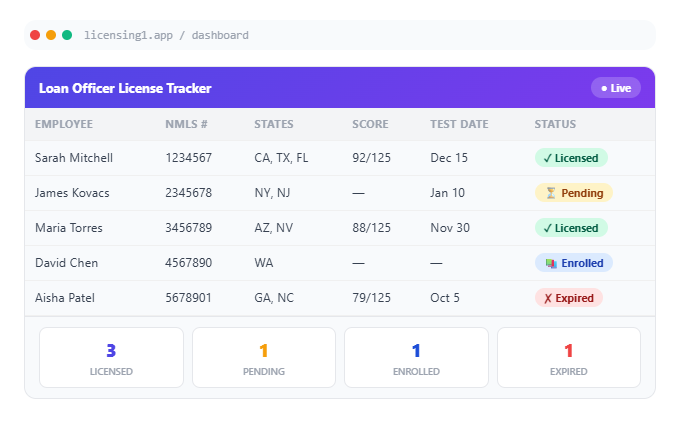
Every license, every expiry
Company, branch, and individual state licenses with numbers and expiry dates, and a U.S. map of where each person can originate. Nothing depends on someone remembering a date.
03
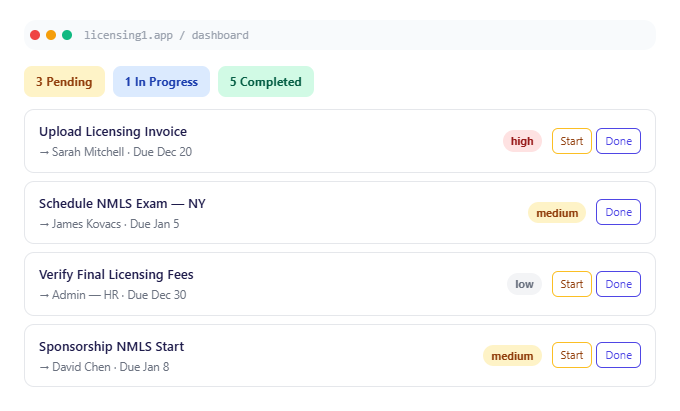
Sponsorship as a pipeline
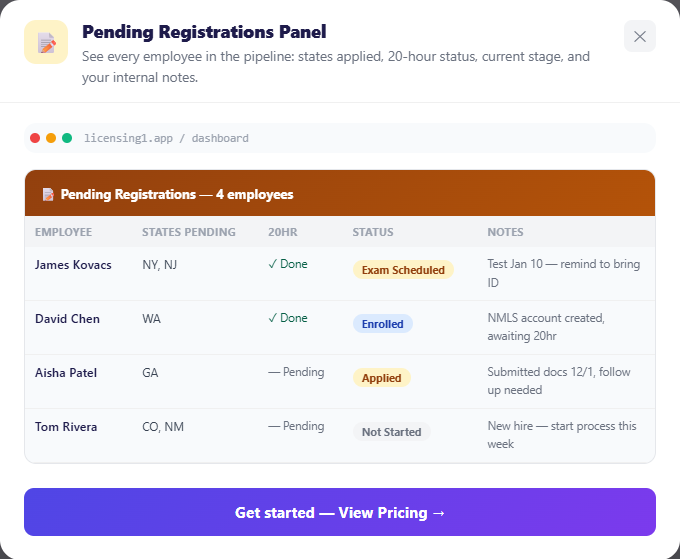
Pending sponsorships and registrations become worked queues with an owner and an action on every name, not an email thread. NMLS verification is recorded against the person and kept.
04
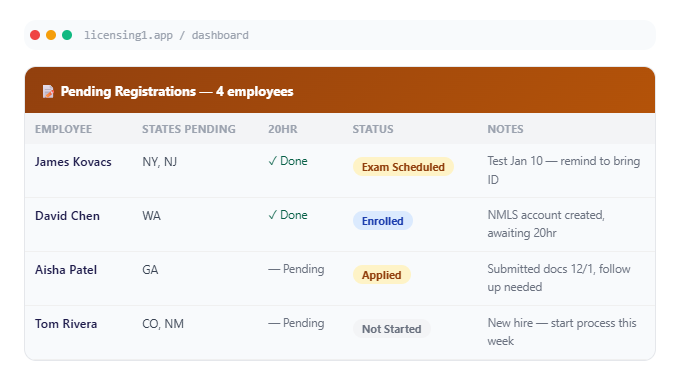
Unlicensed to licensed
The path from hire to producing, tracked per person: the 20-hour course, NMLS account, certificate, exam date and location, pass or fail, score, and attempt number, with every earlier attempt kept underneath.
05
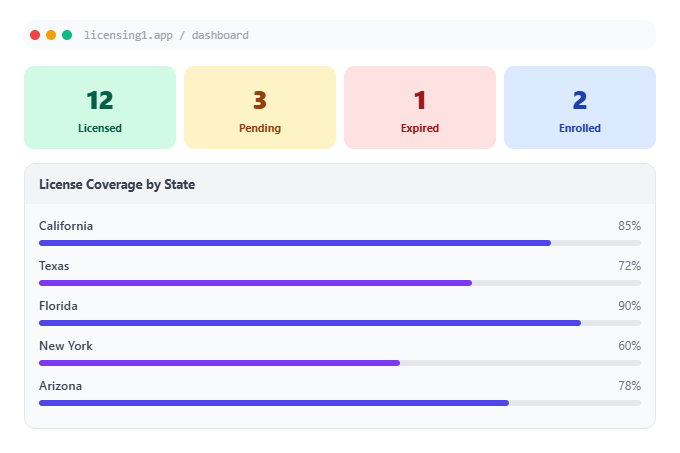
Compliance you can see
A 0–100 health score, what has expired, what is due inside the window, who still owes continuing education, and a per-state requirement checklist with its sources cited.
06
Licensing spend, per person
Every licensing invoice by person, branch, state, and year with the receipt attached, imported straight from an NMLS export. Licensing costs stop being a mystery at budget time.
Around all of it: tasks the system raises as renewals and CE deadlines approach, messaging attached to the record it concerns, a permissioned document library, support ticketing, spreadsheet export everywhere, and separate portals for every role.
How it works
From spreadsheet to system of record in four steps.
Load your roster
Upload your existing spreadsheet and the whole company becomes records in one pass, grouped by branch. Add individuals or invite them by email. Licensing invoices import straight from an NMLS export.
Record every license
Company, branch, and individual state licenses go in with numbers and expiry dates. Each person gets a state map, and new hires start on the path to licensed.
Let the system watch the dates
Renewals, continuing-education deadlines, and exam dates become tasks with an owner before they are due. The health score shows where you stand at a glance.
Work it, then prove it
Work sponsorships and new hires as queues, message people from the record, and export any view when an examiner, auditor, or budget meeting asks.
Full feature list
Everything in the product today.
Roster & people
- One roster across all branches, with live counts per branch
- Search by name, email, NMLS ID, or position
- Bulk import from a spreadsheet; individual add; email invitations
- Deactivated staff kept on file, with a voluntary or involuntary reason
- New Hires list for people who haven't started yet, plus an onboarding questionnaire when they join
- Quick view, quick notes, and bulk edit on the people list
Licenses
- Company and branch licenses by state, with number and expiry, editable inline
- Individual state licenses per loan officer, with status by state
- Interactive U.S. license map for every person
- State Reviews: a document vault with a folder per state
Pipelines
- Pending sponsorship and pending registration queues
- Unlicensed employees tracked through course, NMLS account, certificate, credit hours, exam date, time and location, score, and pass/fail
- New exam attempts archive the previous one
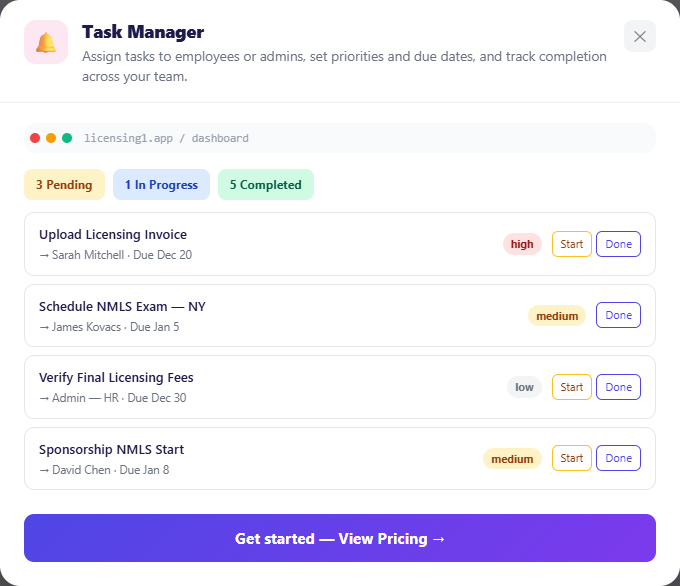
- A passed exam automatically creates a "start sponsorship" task
Compliance & education
- Compliance health score (0–100) with the numbers behind it
- Renewal tracking for company, branch, and individual licenses
- Pre-licensing (PE) and continuing education (CE) status, courses enrolled and completed
Licensing spend
- Invoices by person, branch, state, and year, with receipts attached
- Import from an NMLS export or any licensing CSV, with a preview before matching
- Invoice folders; licensing companies can send invoices to their brokers
Work & communication
- Tasks raised automatically as renewals and deadlines approach
- Company, personal, and assigned-to-me tasks, in list or kanban view, with search and reassignment
- "Open in NMLS" link on tasks that carry one
- Messaging attached to the person or record it concerns
- Notifications, with email settings per branch
- Resource library (company-shared and personal)
- Built-in support ticketing
For licensing companies
- Search registered brokers, request access, and manage client companies
- Team workspace: assignments, open-task counts, out-of-office coverage, per-member dashboards
- Broker-granted, revocable visibility only
Reporting & access
- Export to spreadsheet from every major tab, choosing the columns
- Per-state requirement checklists from a maintained State Regulatory Library, with sources
- Exam readiness score per state, showing requirements with no document attached
- Licensing cost estimator for first-year and recurring costs across states, branches, and loan officers
- Separate portals for each role; sign-in routes each user to theirs
- Single sign-on with Google or Microsoft
- Per-tab admin permissions; automatic sign-out after inactivity
- First-visit guided tours; phone-friendly layout for employee dashboards
Portals
A portal for every role.
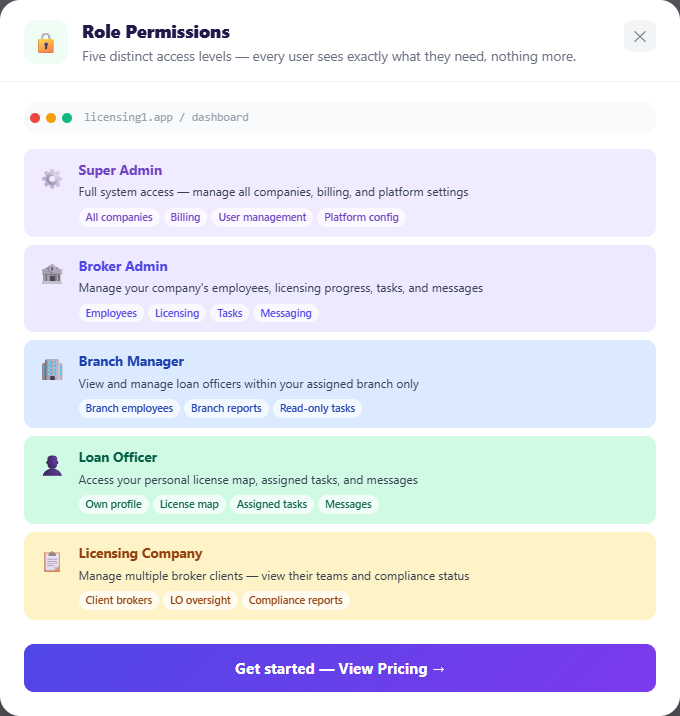
Sign-in routes each person to the view that matches their job. Nobody sees more than they need to.
| Company owner / admin | The whole company: roster, branches, all licenses, compliance, invoices, tasks, documents, billing, and admin permissions. |
|---|---|
| Branch manager | Their branch's people, licensing progress, and task assignment. |
| Loan officer | Their own license map, education status, tasks, messages, and personal information. |
| Employee | Their own record and their path to becoming licensed. |
| Licensing company | Every client broker they manage, their team, invoices, and shared resources. |
| Licensing employee | The companies assigned to them, their tasks, and out-of-office coverage. |
AI assistance
Describe the job. Review the plan. Confirm.
The Licensing Assistant takes a request in plain language, looks up what it needs, and lists the exact changes it would make. Nothing happens until you press Confirm.
The Compliance Copilot answers questions using your live compliance data and the state regulatory library.
Pricing
Plans that scale with your team.
Published plans by team size for brokerages, from small shops to enterprise, with separate plans for licensing companies. Every plan starts with a 7-day free trial.
See plans at licensing1.com → Live in production at licensing1.com.
FAQ
Frequently asked questions
Does Licensing 1 replace NMLS?
No. NMLS stays the regulator's system of record for filings. Licensing 1 is where your team runs the work around it: queues, owners, dates, documents, and history.
Can our licensing company work with us in it?
Yes. Licensing companies have their own portal. A broker grants them access, sees what is shared, and can revoke it.
What happens when someone leaves?
They are deactivated, not deleted. Their licensing history stays on file.
Can we get our data out?
Yes. Every major view exports to a spreadsheet, and you choose the columns.
Does it work on phones?
It runs in any modern browser, and employee and loan-officer dashboards have a phone layout. There is nothing to install.
Is there a free trial?
Yes, 7 days.
Does it use AI?
Yes, for assistance only. The assistant proposes changes and nothing happens until you confirm them.
Get started
Make renewal season a countdown, not a scramble.
Every open item gets an owner and a date, starting in September.